
Basic for Blog Beginner's Managing pages,labels and post:
Getting Started :
Below Image Shows the Basic Difference's between a Page and Labels,
 >Labels Show the How many Post in a that Label
>Where as page Didn't Show that
How to add a Label:
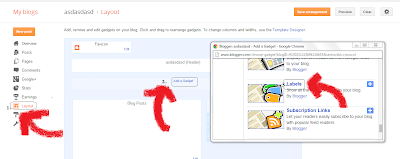
Step 1: Click on Layout
Step 2: Add a Gadget,Browse for Label
Step 3:Click on + Symbol and Click on Save

 Step 1: View Your Blog and Click on previously label softwares and Copy entier URL (http://wxternaldownlaods.blogspot.in/search/label/Softwares),now click on Pages and tap on new page and select Web address there.and Save it


Getting Started :
Below Image Shows the Basic Difference's between a Page and Labels,

>Where as page Didn't Show that
How to add a Label:
Step 1: Click on Layout
Step 2: Add a Gadget,Browse for Label
Step 3:Click on + Symbol and Click on Save

4.After Adding a label, Link Your newly Created Post To a label by Typing a new name and Click ok

How To link a Post To a Page:
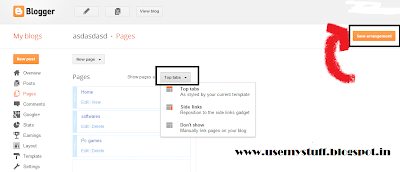
 Step 1: View Your Blog and Click on previously label softwares and Copy entier URL (http://wxternaldownlaods.blogspot.in/search/label/Softwares),now click on Pages and tap on new page and select Web address there.and Save it
Step 2:And Then Change The Show Post by set it to Top Tabs and click on save arrangement.

Step 3: Click on View Blog Simple!!!!!!!!!

(Note: If you Don't want show labels remove the label Gadget)
Rate This Post Sharing is Caring!!!!!!!!!!!


